A tour of the sample app
MobileTransformersApp is the reference consumer of the SDK: everything it does, it does through the
public facade, and a guard test enforces that. It is also the fastest way to see what the framework
actually is — export → pull → chat → retrieve → classify → fine-tune → merge → tool-call, all on the
phone, with no server anywhere.
This page is the tour: one section per capability, which package it needs, and what you should see.
make android-builddoes not source.env. The APK builds fine and then silently cannot pull private repos, because the token is baked in at build time. Runset -a && . ./.env && set +afirst if you want the private catalog entries to install.
The drawer tells you what the package can do
Eight destinations in three groups — Run a model, Train on device, Setup. What you see depends on the package you have loaded, and the distinction is deliberate:
- Blocked — reachable, with the reason written on it, because the reason is the instruction ("this package has no train/ stage — pull one with Training requested").
- Hidden — not applicable at all. A chat box on an embedding model is a promise the package cannot keep, so it is left out rather than greyed out.
All of it derives from RuntimeCapabilities, computed from the artifacts actually installed. The
drawer cannot claim a capability the package does not have, or withhold one it does.
| you load | you get |
|---|---|
SmolLM2 / Qwen2.5 with train + rag |
everything except Classify |
| all-MiniLM-L6-v2 alone | Models, Retrieval, Train, Federated — no Chat, no Classify |
| distilbert-sst2-english | Models, Classify, Train, Federated — no Chat, no Retrieval |
Models — where a package comes from
Needs: nothing. This is the first screen for a reason: on a clean install nothing else can do anything until a package exists.
Two tabs. Catalog is the shelf from CATALOG.md, read out of
assets/model_catalog.json — each card shows the measured download size, the feature groups, and the
PEFT method the package was exported with. At the bottom, Advanced: pull any package takes a Hub id
directly, for a package you exported yourself. Installed is what is already on the device.
Start with SmolLM2-135M-Instruct: smallest useful chat model, fastest to pull, fastest to train.
What you should see: a progress row while it downloads, then the model bar at the top of every screen naming the loaded package, its engine and its precision.
An entry marked "not published" stays visible with Install disabled. An entry that 404s on tap is worse than no entry — the user cannot tell "not published" from "your token is wrong" from "the app is broken".
Chat — generation, streaming, grounded answers, tool calls
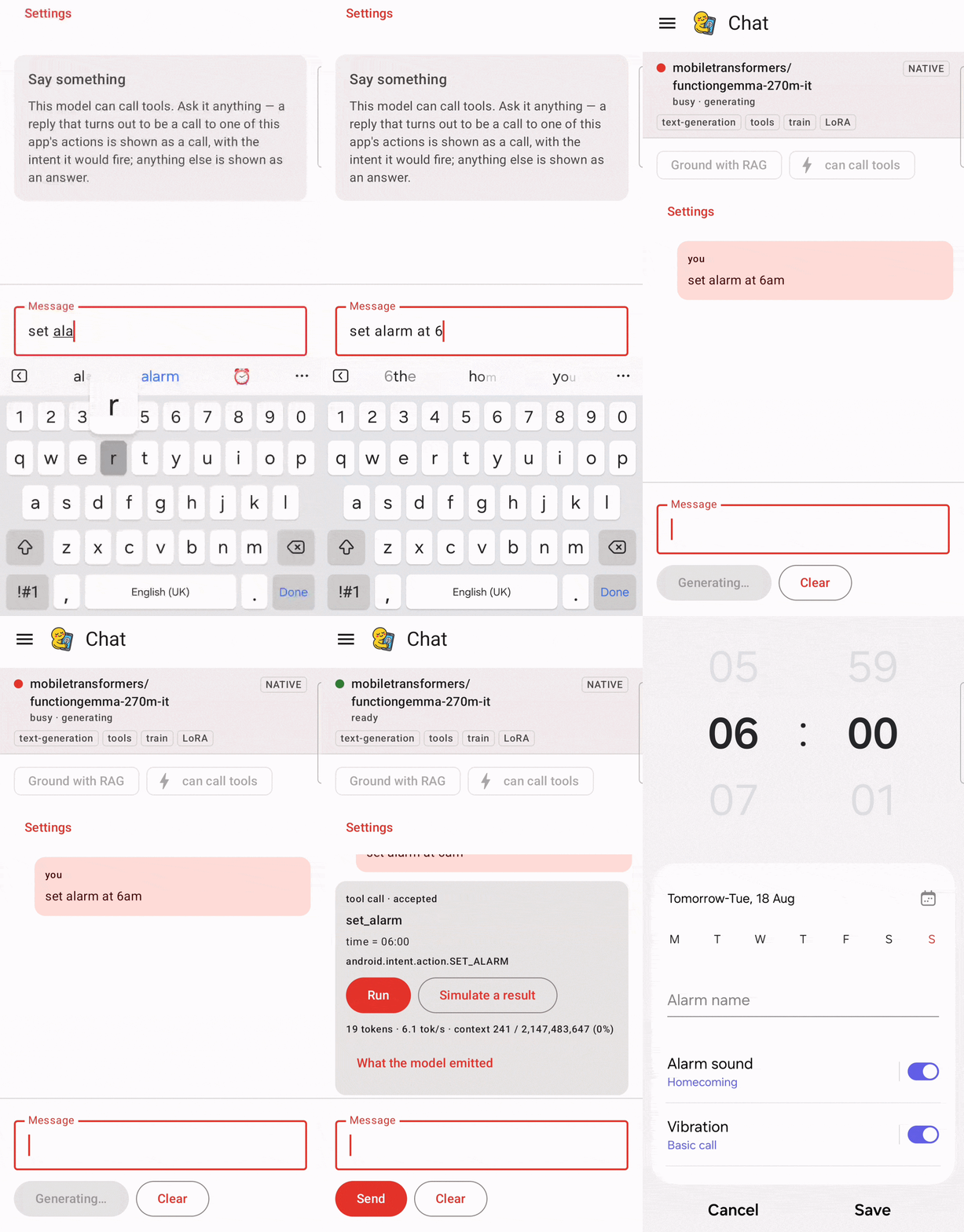
Needs: any decoder (SmolLM2, Qwen2.5, FunctionGemma). Hidden for encoders.
Type and send; tokens stream as they are produced. Two things worth doing here:
Ground with RAG (the chip, enabled once the package has an embedding stage) answers from the documents you ingested on the Retrieval screen instead of from the model's own weights. Retrieval posts its own turn before the answer — "Found 4 passages in 2 documents", naming the files, with the passages themselves behind a toggle — and then the answer streams in beneath it, carrying the prompt that was actually built. So a bad grounded answer is debuggable in reading order: you see what was found, then what the model did with it, which is what separates wrong retrieval from a model ignoring good retrieval.
Tool calls are detected from the answer, not declared in advance. Ask FunctionGemma to set an alarm and it emits a structured call; the app validates it against the allowlist in Configuration ▸ Actions, shows you what it is about to do, and only runs it if you accept. Nothing executes without that tap.
What you should see: for an accepted SET_ALARM, an alarm actually appearing in the clock app.
Retrieval — search on its own
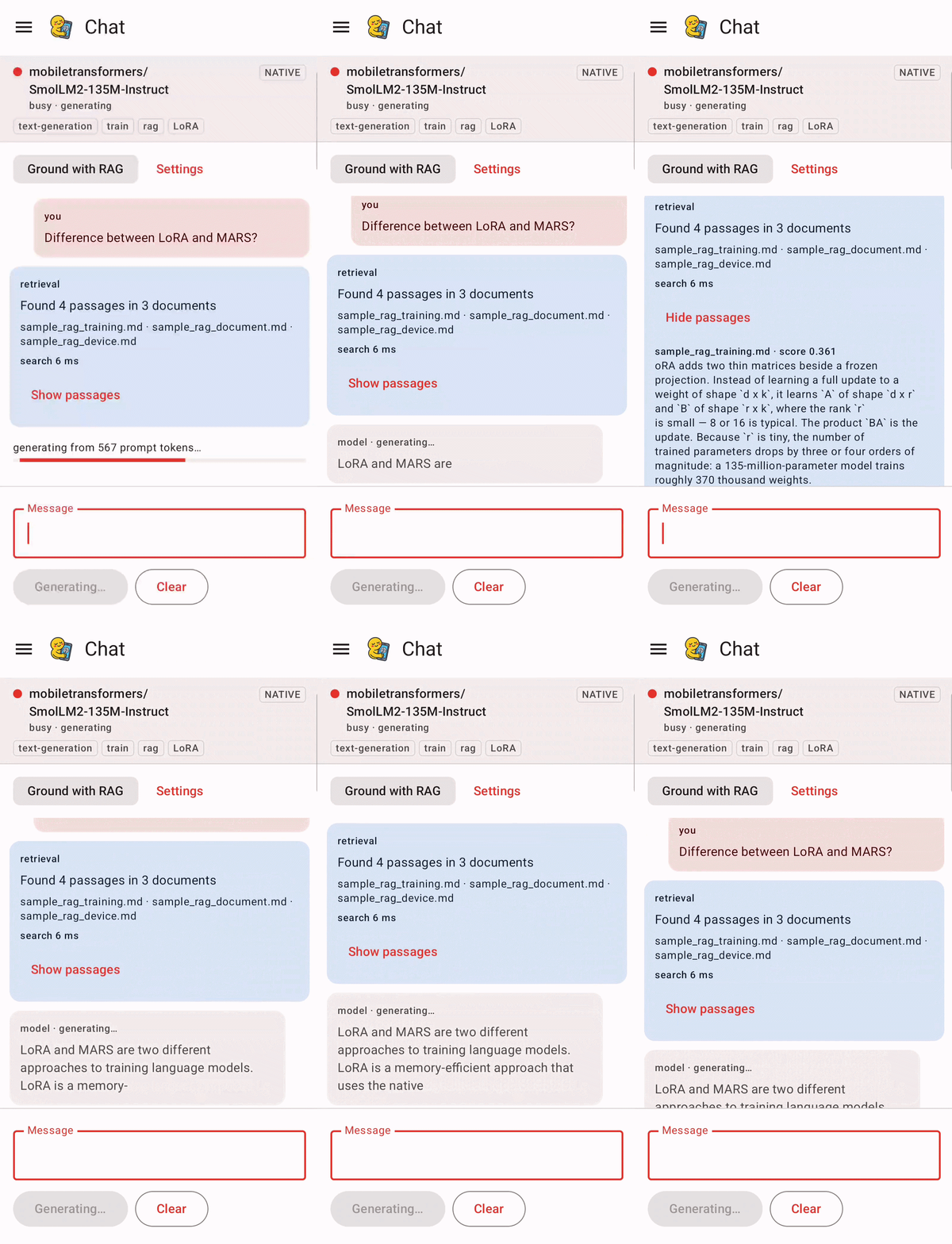
Needs: any package with an embedding stage — including all-MiniLM-L6-v2 by itself.
Ingest the bundled sample documents or pick a file, then search. You get ranked passages with scores and nothing generated.
It is its own destination rather than a corner of Chat for two reasons. It is the only part of the retrieval story a pure encoder can show at all, since an embedding model has no generative head. And it is the only place retrieval can be judged on its own: inside a grounded answer, bad retrieval and a model ignoring good retrieval are indistinguishable.
Classify — labels with probabilities
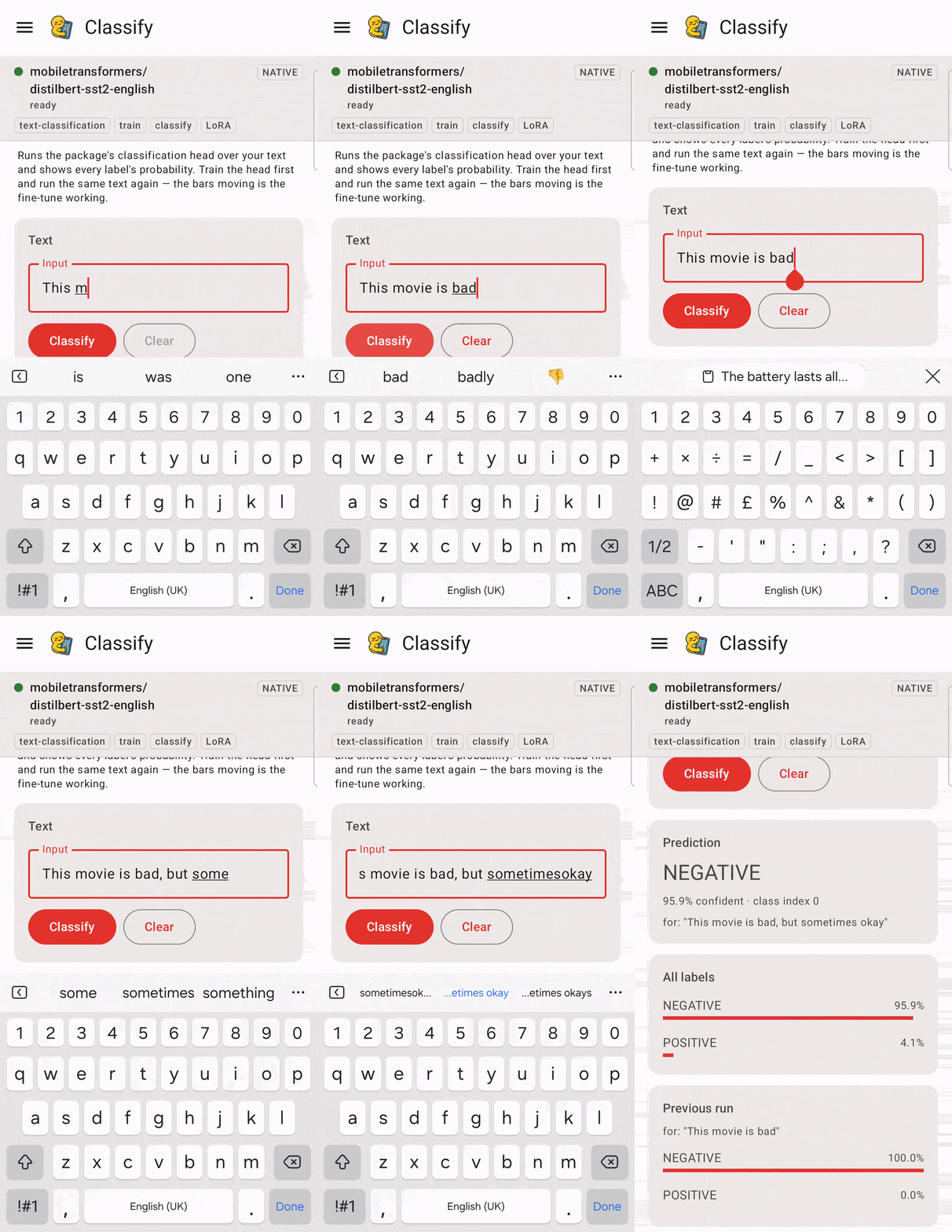
Needs: a classifier that names its labels. In practice: distilbert-sst2-english.
Type a sentence, see the probability assigned to each label.
Deliberately a distribution rather than a single answer — a classifier that is 34%/33%/33% has told you nothing, and a single top label hides that completely.
Hidden for all-MiniLM-L6-v2 even though that package has a classification graph, because its head
is randomly initialised and its labels are LABEL_0/LABEL_1. A number in a costume is worse than an
absent screen. See CATALOG.md for why the encoder is exported that way at all.
Train — fine-tuning, on the phone
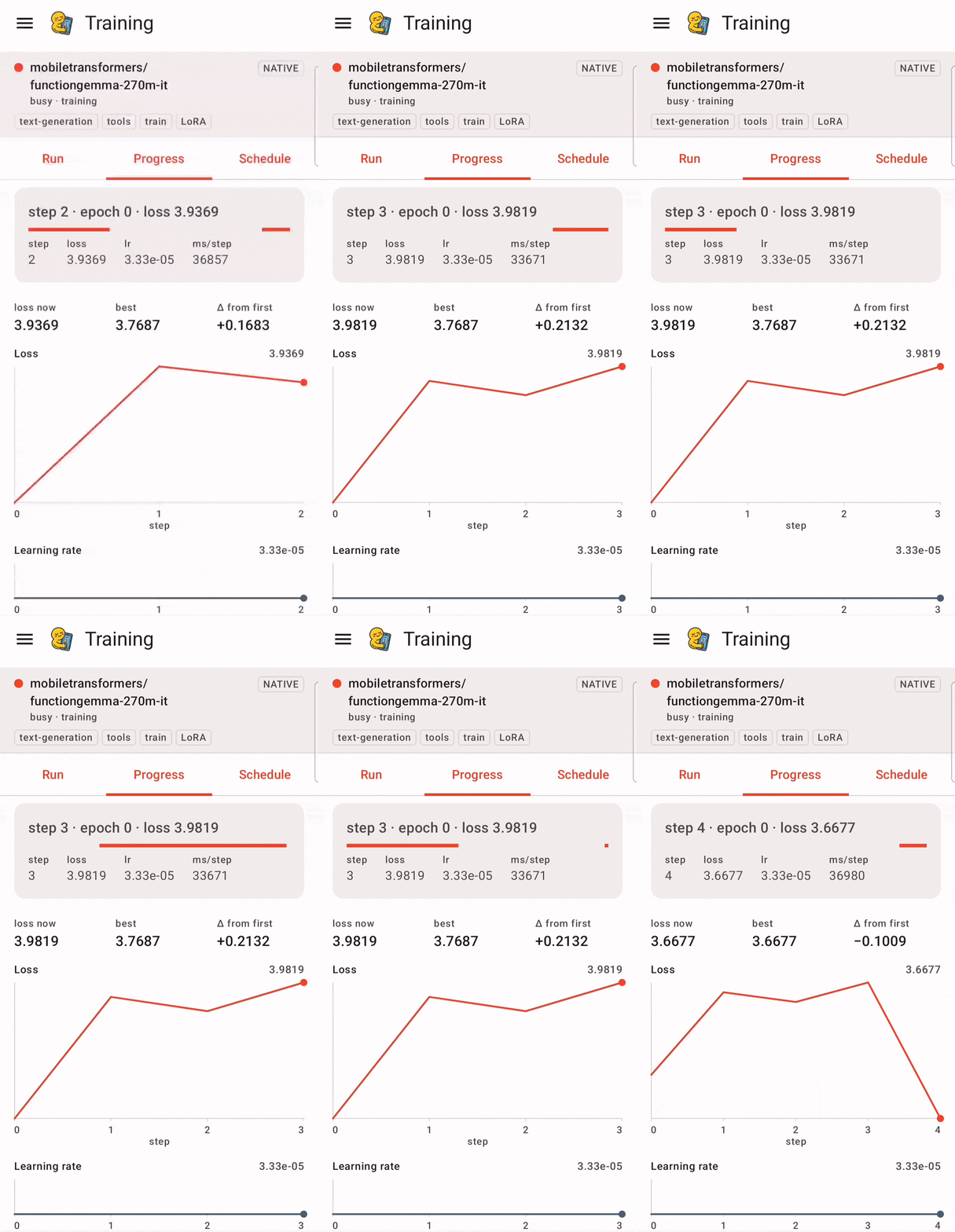
Needs: a package pulled with Training requested (train in its features).
Install the sample dataset, press Start. You get a live loss curve, and the run survives the app going to the background — it is a foreground WorkManager job, which is why the app asks for notification permission the first time.
Then press Merge. This folds the trained adapter into the inference weights on device, and it is the step that makes the fine-tune real: generate before and after and the model's behaviour changes.
Scheduling lives in Configuration ▸ Training. A scheduled run's start delay is a floor, not an
appointment — an exact wall-clock start needs SCHEDULE_EXACT_ALARM, which Play restricts to alarm
clocks and calendar reminders. The UI says so rather than pretending otherwise.
Federated — one round of adapter exchange
Needs: a trainable package.
Exports the local adapter factors, and expects a host-side aggregation step to hand back an average.
The consent gate is on screen rather than implied: FEDERATION_ENABLED is false by default, and
rather than hiding the feature the screen says so and still lets the button be pressed. The resulting
FederatedConsentException names the missing protection, which is more useful to an integrator than a
greyed-out control with no explanation.
Configuration — six tabs of typed settings
Generation (length and sampling), Training (run length, optimizer, PEFT method, what happens after the run), Dataset (which file and how to read it), Retrieval (shape, search, chunking), Actions (what a model may ask for, and what happens when it does), Device (execution, and when a change takes effect).
Chat's "Settings" link opens Generation directly.
About
What the app is, in what order to use it, and the two device settings that change what it can show.
Related
- CATALOG.md — the published packages and which to start with
- ANDROID_SDK.md — consuming the AAR in your own app
- COOKBOOK.md — copy-pasteable Kotlin per task
- ARCHITECTURE.md — how the host exporter and the device SDK fit together